Why Does My Washing Machine Wi-Fi App Keep Disconnecting
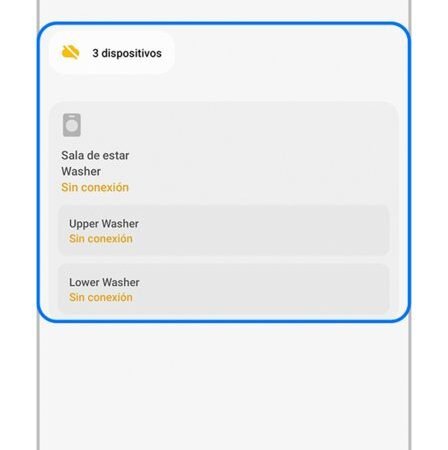
Why does my washing machine wifi app keep disconnecting? The “smart” washing machine that can’t stay connected to wifi is a special kind of modern frustration — you bought remote start and cycle notifications, and got an app that perpetually says “device offline”. I’ve wrestled with these, and the causes are depressingly consistent.
Here’s what’s going wrong and how to fix it.
Why Does the Washing Machine Wifi App Keep Disconnecting?
Cause 1: the 2.4 GHz problem. Nearly all smart appliances only speak 2.4 GHz wifi, and modern routers with merged bands (“smart connect”) confuse them endlessly — the appliance joins, gets steered to 5 GHz, drops, rejoins, drops. This single issue causes the majority of smart-appliance disconnects. Fix: split your router’s bands into separate network names (e.g. “Home” and “Home-5G”) and join the appliance to the 2.4 GHz one.
Cause 2: signal strength. Washing machines live in kitchens and utility rooms — often the furthest point from the router, surrounded by metal (the machine itself is a metal box that blocks signal) and water pipes. Check the signal at the machine’s location with your phone; if it’s weak there, the appliance has no chance.
Cause 3: IP address churn. When the router reboots or the DHCP lease expires, the appliance gets a new IP and the app loses track of it. Cause 4: the app/cloud service itself — manufacturer smart-home clouds are notoriously flaky; sometimes “device offline” means their servers are down, not your wifi. Check the manufacturer’s status page before tearing your network apart. How Can I Stop Nuisance Calls on My Mobile in the UK
Fixes That Actually Work
1. Split the wifi bands as above — this fixes most cases outright. 2. Give the appliance a static IP / DHCP reservation in the router settings so its address never changes. 3. Improve signal at the machine: move the router if practical, or add a mesh node/powerline adapter near the kitchen — smart appliances need only a little bandwidth, but they need it consistently.
4. Re-pair from scratch: remove the appliance from the app, factory-reset its wifi (check the manual — usually a button hold), and re-add it while standing next to the machine with your phone on the 2.4 GHz network. 5. Update everything: appliance firmware (via the app, when connected) and the app itself — manufacturers quietly fix connectivity bugs.
6. Check router limits: some ISP routers cap connected devices or aggressively disconnect “idle” ones — smart appliances look idle between cycles. A router reboot schedule or a better router fixes this class of problem. Which? washing machine reviews including smart features
- Split 2.4 GHz / 5 GHz bands — fixes most disconnects
- Metal washing machines block wifi — check signal strength
- Static IP stops the app ‘losing’ the appliance
- Re-pair from scratch next to the machine
- ‘Device offline’ sometimes means the maker’s cloud is down
Is the Smart Bit Even Worth It?
Honest question, honestly answered: for washing machines, the smart features are marginal. Remote start sounds great until you realise someone still has to load the machine and empty it — the “remote” part saves you walking to the kitchen. Cycle-end notifications are genuinely useful (no more forgotten damp loads), and downloaded specialist cycles are nice, but that’s about it.
If the connectivity fight is ruining your life, consider: just use it as a dumb machine. The wash quality is identical; you’re losing notifications, not cleaning power. There’s no shame in a smart appliance living a dumb life — I know several “smart” ovens whose owners never connected them, happily.
But if you want the features: get the network right once (split bands, good signal, static IP) and it generally stays working. The pain is all in the initial setup; a properly configured smart appliance is boringly reliable afterwards. And when buying your next one, check app reviews before purchase — some brands’ apps are far better than others, and that’s worth knowing upfront. Can I Watch UK TV Catch Up Apps on a Firestick When Abroad Samsung: connecting a washing machine to wifi
When It’s the Manufacturer’s Cloud, Not Your Wifi
Sometimes the fault isn’t yours at all. Manufacturer smart-home clouds have outages — Samsung SmartThings, LG ThinQ, Bosch Home Connect all have occasional downtime when apps show every device “offline” simultaneously. Before rebuilding your network, check: is it just the washer, or all smart devices? All offline = cloud or internet outage, not a washer problem. Check the manufacturer’s status page or DownDetector.
App updates break things: a smart-home app update can log you out or lose device pairings — check you’re still signed in before assuming hardware failure. Account region mismatches (buying a grey-import appliance registered to another country’s cloud) cause chronic weirdness that’s very hard to fix — buy UK-stock appliances for UK clouds. And 2.4GHz-only setup quirks recur after router firmware updates that re-merge bands — if the washer drops after a router update, check the band settings first. Diagnose cloud-vs-local before touching anything: it saves hours.
Key Takeaways
- 2.4 GHz-only appliances + merged-band routers = disconnects
- Give smart appliances static IPs in router settings
- Check the manufacturer’s cloud status before troubleshooting
- A dumb washing machine washes just as well
- Check app reviews before buying your next smart appliance
Frequently Asked Questions
Why does my smart appliance only connect to 2.4 GHz?
Most smart home devices use 2.4 GHz-only chips — cheaper, longer range, and plenty fast for tiny data transfers. They can’t see or use 5 GHz networks.
Will a mesh system fix smart appliance disconnects?
Often yes — better consistent coverage reaches kitchens and utility rooms, and most mesh systems handle band steering more gracefully than ISP routers.
Is it safe to use smart appliances as ‘dumb’ ones?
Completely — all washing functions work normally without wifi. You just lose remote notifications and downloadable cycles.
Do smart washing machines work without the app?
Completely — every wash function works from the machine’s own controls. The app adds remote start, notifications and downloadable cycles, but the machine is fully functional standalone. If the app frustrates you, the dial still works perfectly.
Wrapping Up
Split your wifi bands, give the machine a static IP, make sure it has decent signal through the metal box it lives in, and re-pair cleanly — that fixes the overwhelming majority of smart washer disconnects. And if the fight isn’t worth it, there’s no shame in letting it live as a gloriously dumb washing machine. It’ll still get your clothes clean. Why Does My Phone Storage Fill Up Even Though I Delete Apps

