Ray Tracing Explained: What It Is and Whether It Matters (2026)
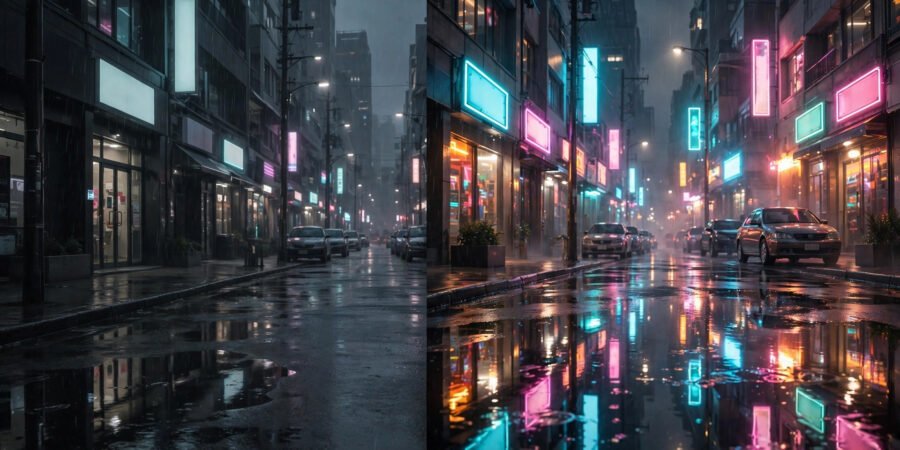
Ray tracing is the most hyped graphics term of the last decade — splashed across GPU boxes, console marketing, and game settings menus. It promises cinema-quality lighting in your games. It also tanks your frame rate if you enable it carelessly. Most gamers have a vague sense it means “prettier” without knowing what it actually does, whether their hardware can handle it, or whether it should influence what they buy.
This guide explains ray tracing with no background knowledge required: what it is, what it changes in the games you play, what it costs in performance, and whether it matters for your next hardware decision.
What Ray Tracing Actually Is
At its core, ray tracing is a way of simulating light. In the real world, light bounces around scenes in enormously complex ways — off walls, through glass, scattering in fog. Traditional game graphics (“rasterization”) fake this with shortcuts: pre-baked lighting, approximations, and clever tricks that look convincing but are not physically simulated.
Ray tracing does it properly: it traces the paths of individual rays of light as they travel from light sources, bounce off surfaces, and reach the virtual camera — essentially simulating physics instead of faking it. The result is lighting that behaves like real light: reflections that show the actual scene (not a painted approximation), shadows that soften naturally with distance, and glass, water, and metal that look genuinely real rather than approximately real.
Film studios have used ray tracing for decades — every Pixar film is ray traced — but it was far too slow for real-time games until dedicated hardware arrived in 2018. That is why it feels new: the technique is old, but doing it 60 times per second is the breakthrough.
What It Changes in Actual Games
The differences are specific rather than general. Ray tracing transforms:
- Reflections. The showcase effect. Puddles, windows, car paint, and marble floors reflect the true scene — you can see things in reflections that are not otherwise on screen. In games like Cyberpunk 2077 or Alan Wake 2, rainy neon streets become almost photorealistic.
- Shadows. Softer, more natural shadows that respond correctly to multiple light sources, instead of the harsh or blobby shadows of faked lighting.
- Global illumination. Light bouncing between surfaces — sunlight streaming through a window realistically lighting the room beyond. This is the subtle one: scenes just feel more believable, even when you cannot say why.
What it does not change: gameplay, art direction, or performance of the underlying game. A bad game with ray tracing is still a bad game — prettier, but bad. And in fast-paced competitive shooters, most players turn ray tracing off deliberately, because frame rate matters more than reflections when someone is shooting at you.
The Performance Cost (The Catch)
Here is the trade-off: ray tracing is enormously expensive computationally. Enabling full ray tracing can cut frame rates by 30–50% on capable hardware — and on weaker hardware, it turns playable games into slideshows. This is why the technology’s rise is inseparable from upscaling technologies: NVIDIA’s DLSS, AMD’s FSR, and Intel’s XeSS render the game at lower resolution and use AI to reconstruct a sharp image, clawing back the frames ray tracing costs.
The practical reality in 2026: mid-range and better GPUs handle ray tracing well at 1080p with upscaling; high-end cards manage 1440p; 4K with full ray tracing remains flagship territory. Consoles offer ray tracing in limited forms — usually a 30fps “quality mode” versus a 60fps “performance mode” without it. That choice, offered in nearly every modern console game, is the entire ray tracing debate distilled: prettier or smoother?
Heat is part of the equation too — pushing your GPU harder means more thermal output, so the cooling fundamentals in our guide to why laptop fans run loudly apply at desktop scale, and our PC performance guide covers the software side of clawing back frames.
Ray Tracing vs Traditional Lighting: A Simple Analogy
Think of traditional game lighting as a theatre set: painted backdrops, clever spotlights, and mirrors positioned to suggest a real place. It looks convincing from the audience — until you look too closely. Ray tracing is like replacing the set with the actual location: light behaves correctly because it is behaving correctly, not because someone faked it well. That is why ray-traced scenes hold up when you stare into a puddle or watch sunlight move across a room — there is no trick to see through, just physics doing its thing sixty times a second.
Should It Influence What You Buy?
Buying a GPU: ray tracing performance is a legitimate differentiator between cards at similar prices — NVIDIA traditionally leads here, AMD has closed the gap. If you play cinematic single-player games and value visuals, weight it. If you play competitive shooters at high refresh rates, weight raw rasterization performance instead.
Buying a console: do not choose based on ray tracing bullet points — all current consoles offer it in limited form, and the differences are minor compared to game libraries and subscriptions.
Upgrading: never upgrade for ray tracing alone. Upgrade because your current hardware struggles with the games you play; treat ray tracing as a bonus, not a reason.
For market context, the BBC’s technology coverage tracks GPU launches accessibly, and Ukie publishes data on how UK gamers actually play — a useful reality check against marketing hype.
The Bottom Line
Ray tracing simulates real light behaviour — true reflections, natural shadows, believable bounced light — instead of faking it, making games look strikingly more realistic in the right scenes. It costs 30–50% of your frame rate, mitigated by AI upscaling like DLSS. It matters if you play cinematic games and value visuals; it barely matters for competitive play, where most gamers disable it. Let it inform GPU choices at the margin, never drive them — and remember that art direction and gameplay will always matter more than lighting physics.
Frequently Asked Questions
Can my PC run ray tracing?
Any NVIDIA RTX card, AMD RX 6000-series or newer, or Intel Arc card supports it — but “supports” and “runs well” differ. Mid-range cards from the last few years handle it at 1080p with upscaling enabled; older or entry-level cards will struggle. Check benchmarks for your specific card and games.
Is ray tracing available on consoles?
Yes, in limited form. PS5 and Xbox Series X offer ray tracing in many games, typically in a 30fps quality mode. It is less comprehensive than PC implementations but visibly improves reflections and shadows in supported titles.
What is the difference between ray tracing and path tracing?
Path tracing is ray tracing taken further — simulating many more light bounces per ray for near-photorealistic results. A few showcase PC games offer it as an ultra-demanding option. Think of ray tracing as the practical version and path tracing as the no-compromises version.
Does ray tracing affect input lag?
Indirectly: lower frame rates mean higher input lag, so enabling ray tracing without upscaling can make games feel less responsive. With DLSS/FSR maintaining high frame rates, the difference is negligible. Competitive players prioritising responsiveness usually disable it.
Will ray tracing become standard?
Almost certainly, gradually. As hardware improves, the performance cost shrinks relative to available power — the same trajectory as every graphics advance before it. In a decade, faked lighting will look as dated as early 3D does now. But the transition is measured in hardware generations, not months.